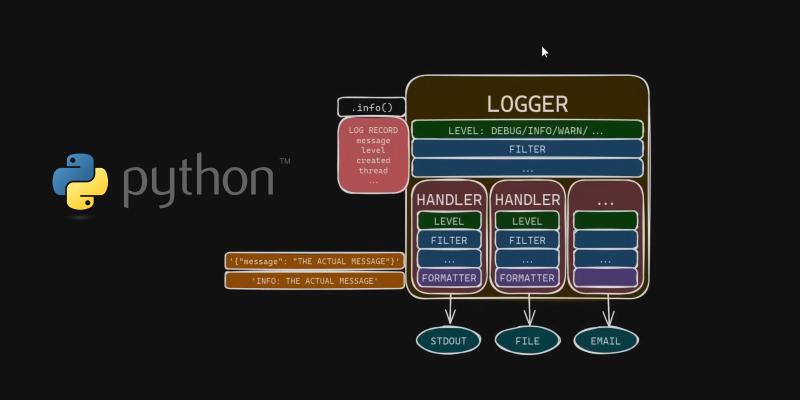
If your first instinct when something breaks is to add a few print() statements, you’re not alone. Most of us started that way.
It works for quick experiments. It doesn’t scale.
Once a project grows, print() debugging quickly turns into noise: mixed outputs, missing context, no log levels, and no easy way to route messages to different destinations.
There’s a better approach: structured, configurable, non-blocking logging using Python’s built-in logging module.
Why logging feels hard (and why it doesn’t have to be)
Python’s logging module has been around since 2002. That’s a good thing — it’s mature, stable, and extremely flexible.
But its age also shows:
- Many examples online use outdated patterns
- Conventions are inconsistent
- The API reflects a pre-modern Python ecosystem
- Tutorials often overcomplicate simple setups
So if logging has ever felt clunky or not worth the effort, that’s understandable. A lot of developers had the same experience.
The good news is that modern logging setups can be simple and clean once you focus on current best practices.
Understanding the modern picture of logging in Python
James Murphy created an excellent video that cuts through the legacy noise and shows how to use Python logging the right way in 2025. No old baggage—just clean, modern practices that scale.
One highlight: he demonstrates how to write a custom JSONFormatter to produce clean JSON Lines (JSONL) logs—perfect for parsing, storing, and analyzing across multiple systems.
If you’re ready to level-up your debugging and observability skills, this video is absolutely worth your time
Structured logging with JSON lines
One particularly useful section covers building a custom JSONFormatter that produces JSON Lines (JSONL) output.
Instead of free-form text logs, you get structured records like:
| |
This format is easy to:
- Parse
- Store
- Index
- Analyze
- Send to log pipelines
It works well with systems like Elasticsearch, OpenSearch, BigQuery, and most observability stacks.
A minimal example looks like this:
| |
You don’t need this setup for every script. But once you’re working on services, background jobs, or anything long-running, structured logs quickly pay for themselves.
Beyond debugging: observability
Good logging is not just about fixing bugs faster.
It’s about being able to answer questions like:
- What failed?
- When did it fail?
- How often does it happen?
- Under what conditions?
- Who was affected?
Print statements don’t help much here. Proper logging does.
Once logs are structured and consistent, they become part of your observability stack alongside metrics and traces.
A practical way to think about AI and logging
With AI-assisted coding becoming more common, it’s also worth mentioning this:
Models are very good at generating logging code. They are less good at designing logging systems.
It’s still up to you to decide:
- What should be logged
- At what level
- In what format
- With which identifiers
- And for which audience
Treat AI as a fast assistant, not as an architect.
Use print() when it makes sense — and move on
None of this means you should never use print().
For quick experiments, one-off scripts, and local exploration, it’s fine.
But for anything that runs in production, is maintained by a team, or needs monitoring, proper logging is a better default.
It makes systems easier to debug, easier to operate, and easier to evolve.
Final thoughts
Learning modern Python logging patterns is one of those small investments that keeps paying back.
It improves your debugging workflow.
It reduces operational friction.
It makes collaboration easier.
I’d love to hear what logging practices are you using in Python — drop a comment on the related LinkedIn post or reach out directly.
Image credit: Frame captured from James Murphy’s video